How we used New Relic entity tags, Terraform, and GitHub Actions to let observability administrators manage alerting without ever touching the infrastructure behind it.
The Problem with Terraform as a User Interface
Terraform is an excellent tool for managing infrastructure. It’s declarative, repeatable, and makes it possible to manage thousands of resources without clicking through a web interface all day. I’ve always been a big proponent of managing as much infrastructure as possible through code, particularly when it comes to resources that need to be configured consistently across multiple environments.
But there’s a problem with taking this philosophy too far: the tool we use to manage infrastructure isn’t necessarily the tool that everyone else should have to use to configure it.
I ran into this problem while working on our observability platform at Scientific Games, where we were managing New Relic alerting through Terraform.
We had hundreds of alert conditions spread across applications and environments. Managing these through Terraform was a massive improvement over configuring everything manually in New Relic. Instead of opening the web interface, locating an alert, modifying its configuration, and repeating that process for every other application that needed the same change, we could modify a Terraform module and apply the change across all the relevant resources.
For platform-wide configuration changes, this was exactly what we wanted.
But consider something a little more mundane. Let’s say an observability administrator notices that a particular application’s latency alert is firing too often and decides the threshold needs to be increased from 200ms to 300ms.
The administrator knows which application is affected, understands the alert, and knows exactly what needs to change. They probably spend a good part of their day in New Relic.
Unfortunately, because the alert is managed by Terraform, they can’t simply change it in the New Relic interface. Well, technically they can, but the next Terraform run will just overwrite their changes.
Instead, they have to get a DevOps engineer involved to modify the Terraform configuration and deploy the change.
In our environment, getting a change like this implemented could take anywhere from half a day to a full day, largely depending on engineer availability. And that’s for a modification that might amount to changing a single number.
There’s an obvious inefficiency here. We’ve automated the management of our monitoring infrastructure, but we’ve also made routine administration dependent on the people who maintain that automation.
So how do we let administrators configure their alerts directly in New Relic without giving up everything we gained by managing them through Terraform?
As it turns out, we don’t need to build another application or expose our Terraform repositories to solve this. New Relic already gives us something we can use as a configuration interface: entity tags.
Using Entity Tags for More Than Just Metadata
If you’ve worked with New Relic for any length of time, you’re probably familiar with entity tags.
For those who aren’t, New Relic allows you to associate key-value metadata with entities such as applications, hosts, and services. They’re useful for things like identifying application owners, distinguishing environments, and grouping related services together.
For example, you might have an application with tags that look something like this:
component_name = payments-api
team           = productA
environment    = prod
Nothing particularly exciting there. These tags just describe the application.
But here’s the interesting part: there’s nothing stopping us from using tags to describe how we want an application to be monitored, either.
What if we added a few more?
component_name = payments-api
team           = productA
environment    = prod

alert.latency  = 250ms
alert.errors   = 3stdev
alert.cpu      = 80%
Now we’ve got something considerably more useful.
Instead of simply describing the application, these additional tags tell our monitoring platform how we want certain alerts configured.
Here’s what we’re expressing:
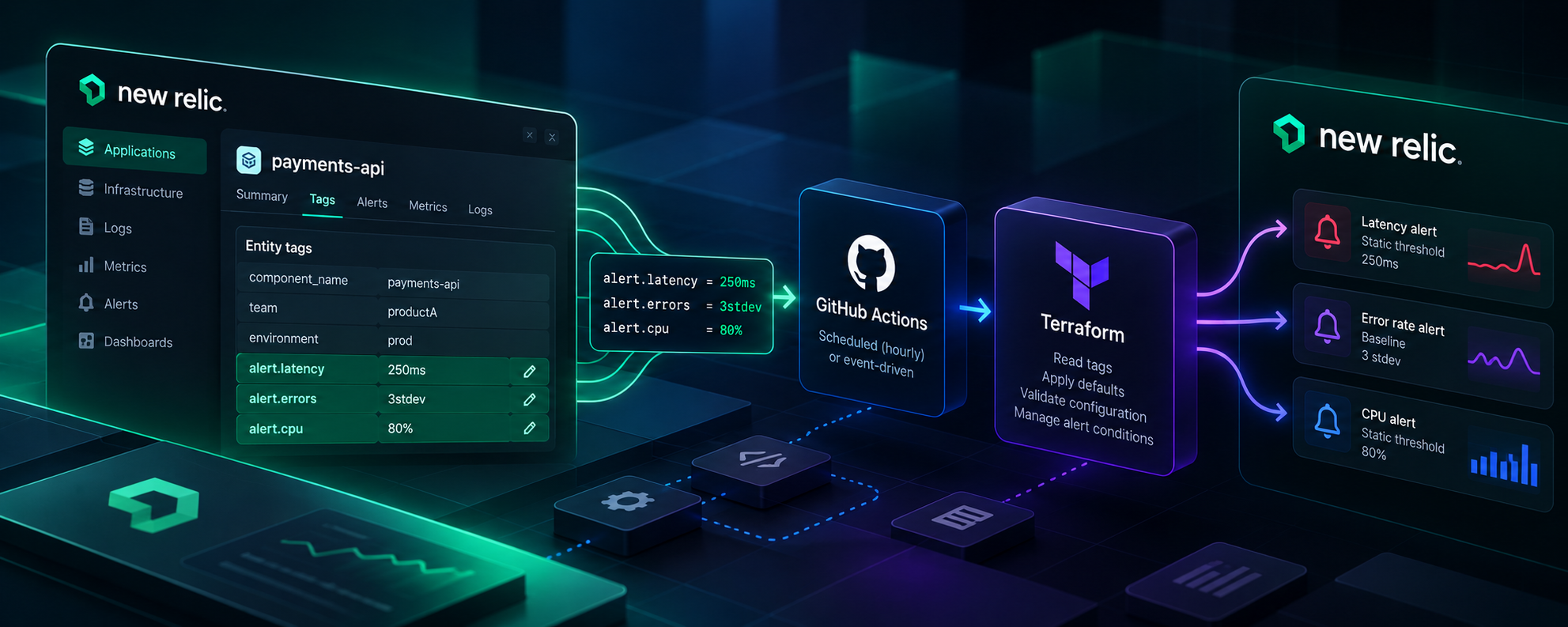
alert.latency=250ms— Create a static latency alert with a threshold of 250 milliseconds.alert.errors=3stdev— Use a baseline alert that detects deviations of three standard deviations.alert.cpu=80%— Create a static CPU utilization alert with a threshold of 80%.
That’s really the entire interface.
An administrator who wants to adjust the latency threshold can open the application in New Relic, modify the alert.latency tag, and they’re finished. No Terraform, no GitHub pull request, and no DevOps engineer required.
Of course, changing a tag doesn’t magically create an alert condition. We still need something to interpret these values and translate them into actual New Relic resources.
That’s where Terraform comes back into the picture.
Defaults and Overrides
One thing I wanted to avoid was requiring every application to explicitly define every alerting parameter.
If we’re managing hundreds of alerts, the last thing we want is hundreds of nearly identical configurations that all need to be updated whenever we decide to change a default.
Instead, our Terraform configuration supplied defaults for supported alert types. Applications inherited these settings unless an administrator explicitly overrode them.
For example, suppose our default latency alert uses a baseline threshold of three standard deviations.
An application with no alert.latency tag simply inherits that default.
But perhaps one application has a strict latency requirement, and its administrator wants an alert whenever average latency exceeds 250ms. They can add:
alert.latency = 250ms
The next time Terraform runs, it interprets that tag and creates or updates the corresponding static alert condition.
If the override isn’t present, Terraform uses the default.
This is an important distinction because it means our configuration is centralized without being inflexible. We can define sensible defaults for every application while still accounting for services whose behavior warrants different thresholds.
And more importantly, the people making those adjustments don’t need to understand anything about how the alert conditions are implemented.
New Relic Handles the Interface, Terraform Handles the Work
At this point we’ve got two pieces of our system.
New Relic provides an interface administrators already know how to use, and entity tags give us a way to represent their desired configuration.
Terraform provides the machinery for translating that configuration into actual alert conditions.
All we need is a way to connect them.
Here’s the basic architecture:
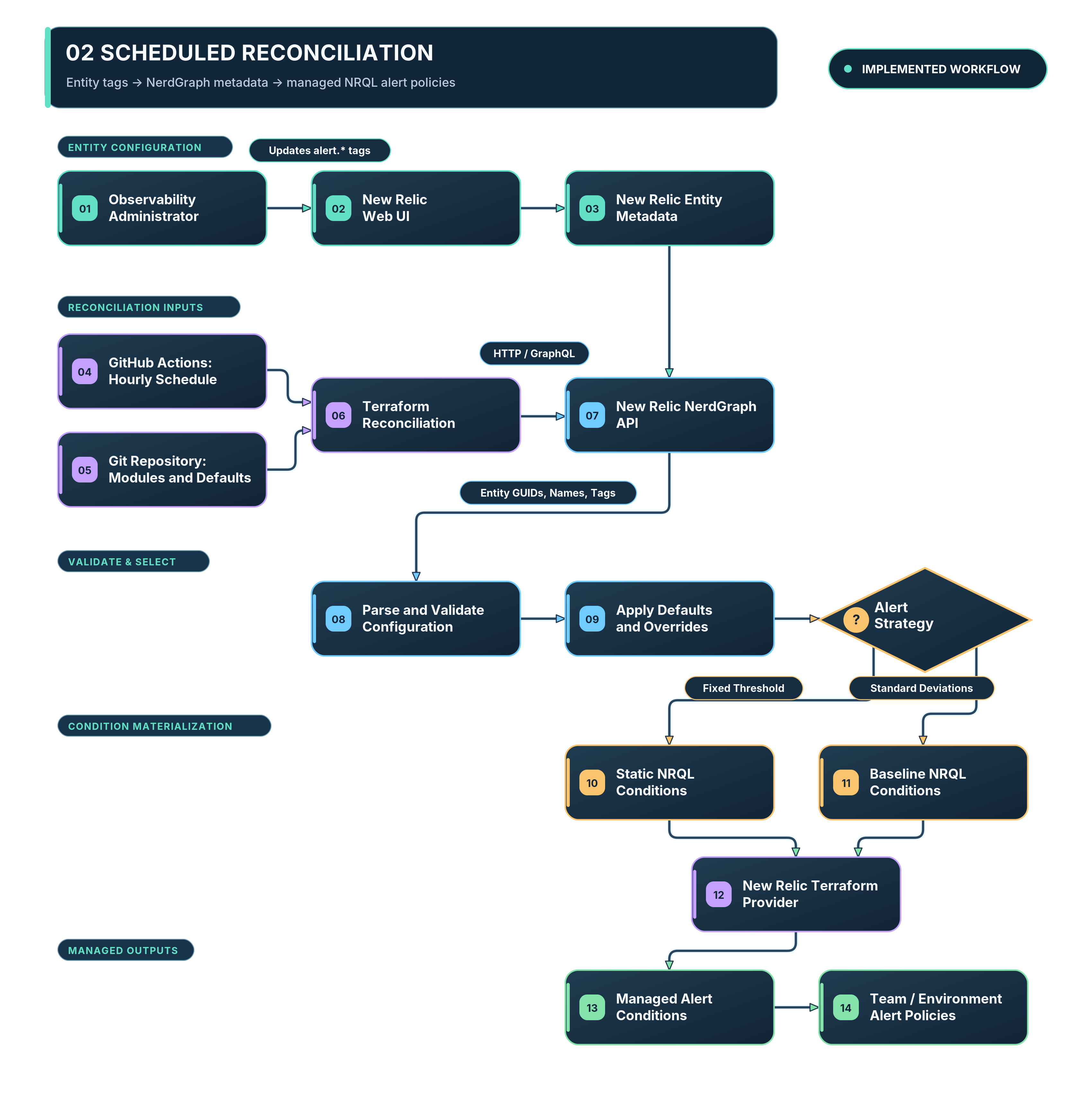
The GitHub Actions workflow ran Terraform on an hourly schedule. Each run queried New Relic for the current entity metadata, processed our configuration tags, and reconciled the alert conditions accordingly.
We organized the alert policies by team and environment, with names along the lines of:
productA-dev
productA-stage
productA-prod

productB-dev
productB-prod
This let us maintain a consistent approach to configuring alerts across environments while keeping the resulting alert conditions organized under the appropriate policies.
There’s a fairly important architectural distinction here that I think is worth pointing out.
New Relic owns the administrator’s configuration. Git owns the code that determines how that configuration gets implemented.
We’re not asking administrators to manage Terraform, and we’re not abandoning Terraform in favor of manual configuration.
We’re simply separating the two responsibilities.
Getting New Relic Configuration into Terraform with NerdGraph
Now for the interesting part: how do we actually read these tags from Terraform?
New Relic exposes a GraphQL API called NerdGraph, which allows us to query entities and retrieve information about them, including their tags.
If you’re unfamiliar with GraphQL, think of it as an API where you specify exactly which fields you want returned, rather than calling an endpoint that returns a predefined response.
In our case, we need three things about each application:
- Its name.
- Its unique New Relic entity GUID.
- Its tags.
GraphQL makes this fairly straightforward.
We used Terraform’s generic HashiCorp HTTP provider to query NerdGraph directly, supplying our New Relic API key through a Terraform variable.
Here’s a simplified version of what that looks like:
data "http" "newrelic_entities" {
  url    = "https://api.newrelic.com/graphql"
  method = "POST"

  request_headers = {
    "API-Key"      = var.new_relic_api_key
    "Content-Type" = "application/json"
  }

  request_body = jsonencode({
    query = <<-GRAPHQL
      query {
        actor {
          entitySearch(
            query: ${jsonencode(var.entity_search_query)}
          ) {
            results {
              entities {
                guid
                name
                tags {
                  key
                  values
                }
              }
            }
          }
        }
      }
    GRAPHQL
  })
}
This is a simplified example. The full implementation needs to account for NerdGraph pagination, API errors, and incomplete responses.
You’ll notice that we’re not using the New Relic Terraform provider for the discovery step. We’re making an ordinary HTTP request to the GraphQL API.
We can use metadata such as component_name to scope the entity search, so Terraform discovers the relevant applications rather than relying on a manually maintained list of entity GUIDs.
The result is a JSON response containing the entity information we requested.
For example:
{
  "guid": "APPLICATION_GUID",
  "name": "payments-api",
  "tags": [
    {
      "key": "alert.latency",
      "values": ["250ms"]
    },
    {
      "key": "alert.errors",
      "values": ["3stdev"]
    },
    {
      "key": "alert.cpu",
      "values": ["80%"]
    }
  ]
}
You may notice that New Relic returns tags as a list of objects containing a key and an array of values. That’s not especially convenient when you’re trying to look up a particular tag in Terraform.
Fortunately, Terraform gives us everything we need to turn this into a more usable structure.
We can decode the JSON response and use a for expression to convert the tag list into a map:
locals {
  response = jsondecode(
    data.http.newrelic_entities.response_body
  )

  entities = {
    for entity in local.response.data.actor.entitySearch.results.entities :

    entity.guid => {
      name = entity.name

      tags = {
        for tag in entity.tags :
        tag.key => tag.values[0]
      }
    }
  }
}
This example assumes each relevant tag has a single value. A complete implementation should reject ambiguous or empty values rather than silently picking one.
Now our application metadata looks something like this:
{
  "APPLICATION_GUID" = {
    name = "payments-api"

    tags = {
      "alert.latency" = "250ms"
      "alert.errors"  = "3stdev"
      "alert.cpu"     = "80%"
    }
  }
}
Much better.
We can now look up values directly by their keys, apply defaults where tags are missing, and feed the resulting configuration into our alert-generation logic.
Turning a Tag into an Alert Condition
One of the more useful features of this approach is that we can express different types of alerts using the same tag.
Take these two values:
alert.latency = 250ms
alert.latency = 3stdev
Both configure latency monitoring, but they mean something quite different.
The first asks for a static threshold of 250 milliseconds.
The second asks for a baseline alert that detects when latency deviates significantly from its normal behavior.
In New Relic, these correspond to different NRQL alert condition types. Ordinarily, we’d need to account for that distinction somewhere in our Terraform configuration.
Instead, we can infer the condition type from the value itself.
For example:
locals {
  latency_value = lookup(
    local.entity_tags,
    "alert.latency",
    "3stdev"
  )

  is_baseline = can(regex(
    "^[0-9]+(\\.[0-9]+)?stdev$",
    local.latency_value
  ))

  is_static = can(regex(
    "^[0-9]+(\\.[0-9]+)?ms$",
    local.latency_value
  ))
}
This gives us two useful pieces of information.
If is_baseline is true, we know the value describes a baseline condition. If is_static is true, we know it describes a fixed latency threshold.
From there, we can strip the unit suffix, convert the remaining value into a number, and use Terraform’s for_each expressions to generate the appropriate newrelic_nrql_alert_condition resources.
The NRQL queries themselves remain part of the Terraform implementation, so administrators aren’t writing arbitrary queries. They’re selecting from the monitoring behaviors we’ve chosen to expose.
There’s a subtle benefit here, too. The tag describes what the administrator wants, not the Terraform resources required to implement it.
If we later decide to change how a particular alert type is implemented, we can update the Terraform module without changing the interface administrators use.
A tag like alert.latency=250ms can continue to mean exactly the same thing even if the implementation behind it changes.
What Happens When Someone Enters a Bad Value?
Of course, once you turn tags into configuration, you inherit all the usual problems associated with accepting user input.
What happens if someone enters this?
alert.latency = really-fast
Or this?
alert.cpu = banana
Neither is particularly useful to a Terraform module expecting a numeric threshold with a supported unit.
We handled missing and invalid values differently.
When a tag was missing, Terraform used the configured default.
When a tag contained an invalid value, the run failed rather than quietly applying some other configuration.
This is worth emphasizing because a missing value and an invalid value aren’t the same thing.
A missing value means the administrator hasn’t requested an override. An invalid value means they’ve attempted to configure something the system doesn’t understand.
Silently falling back to a default in the second case can be dangerous, particularly if the administrator assumes their requested threshold has been applied.
There’s also a tradeoff here: if one invalid tag causes an entire Terraform run to fail, it can prevent otherwise valid changes from being applied.
Ideally, validation should happen before Terraform attempts to modify any resources, and the failure should identify the affected entity, tag, and expected format.
That becomes pretty important when you’re managing hundreds of conditions.
Letting GitHub Actions Do the Heavy Lifting
We’ve now got a way for administrators to express their configuration in New Relic and a Terraform module capable of interpreting it.
But if someone still has to run Terraform every time an administrator changes a tag, we haven’t really solved the original problem.
We need the entire process to happen without anyone manually operating the infrastructure.
For this, we used GitHub Actions.
Our original implementation ran Terraform on an hourly schedule. A simplified workflow trigger looks like this:
name: Reconcile New Relic Alerts

on:
  schedule:
    - cron: "0 * * * *"

  workflow_dispatch:
The cron expression tells GitHub Actions to schedule the workflow at the beginning of every hour.
One thing worth knowing is that scheduled GitHub Actions workflows aren’t guaranteed to start at the exact scheduled minute. GitHub can delay execution, particularly during periods of high load. So this gives us hourly reconciliation, not a guarantee that every change is applied within precisely 60 minutes.
During each run, Terraform retrieves the current entity metadata from NerdGraph, applies our configuration logic, and determines which resources need to be created or updated.
If an administrator changed a threshold since the previous run, Terraform picks up that change and reconciles the corresponding alert condition.
If nothing changed, Terraform has nothing to update.
That’s the beauty of using a declarative tool for this. We don’t have to write imperative logic describing how to modify every possible alert condition. We describe the desired configuration, and Terraform works out the difference between that and the infrastructure it manages.
From Half a Day to Hourly Reconciliation
Remember the administrator who needed to change an application’s latency threshold?
Previously, they might have spent half a day or more waiting for a DevOps engineer to make a relatively trivial change in Terraform.
With this approach, they could change the relevant tag themselves and have it picked up by the hourly reconciliation process.
We didn’t need an engineer to manually update Terraform configuration for every supported threshold adjustment.
That was a substantial operational improvement.
It also meant our DevOps engineers could spend less time making repetitive changes to alert thresholds and more time working on the actual observability platform.
I think that’s an important distinction when evaluating automation.
It’s easy to measure automation by how many resources it creates or how quickly a script runs. But removing dependencies between teams can be just as valuable, particularly when those dependencies turn small administrative changes into hours of waiting.
Why I’d Make It Event-Driven Today
While hourly reconciliation worked well for our needs, there’s an obvious limitation: an administrator might update a tag immediately after a scheduled run and have to wait until the next run before the change is applied.
We can do better than that.
If I were extending this system, I’d introduce an event-driven mechanism that triggers a Terraform reconciliation when relevant entity metadata changes.
Conceptually, the flow would look like this:
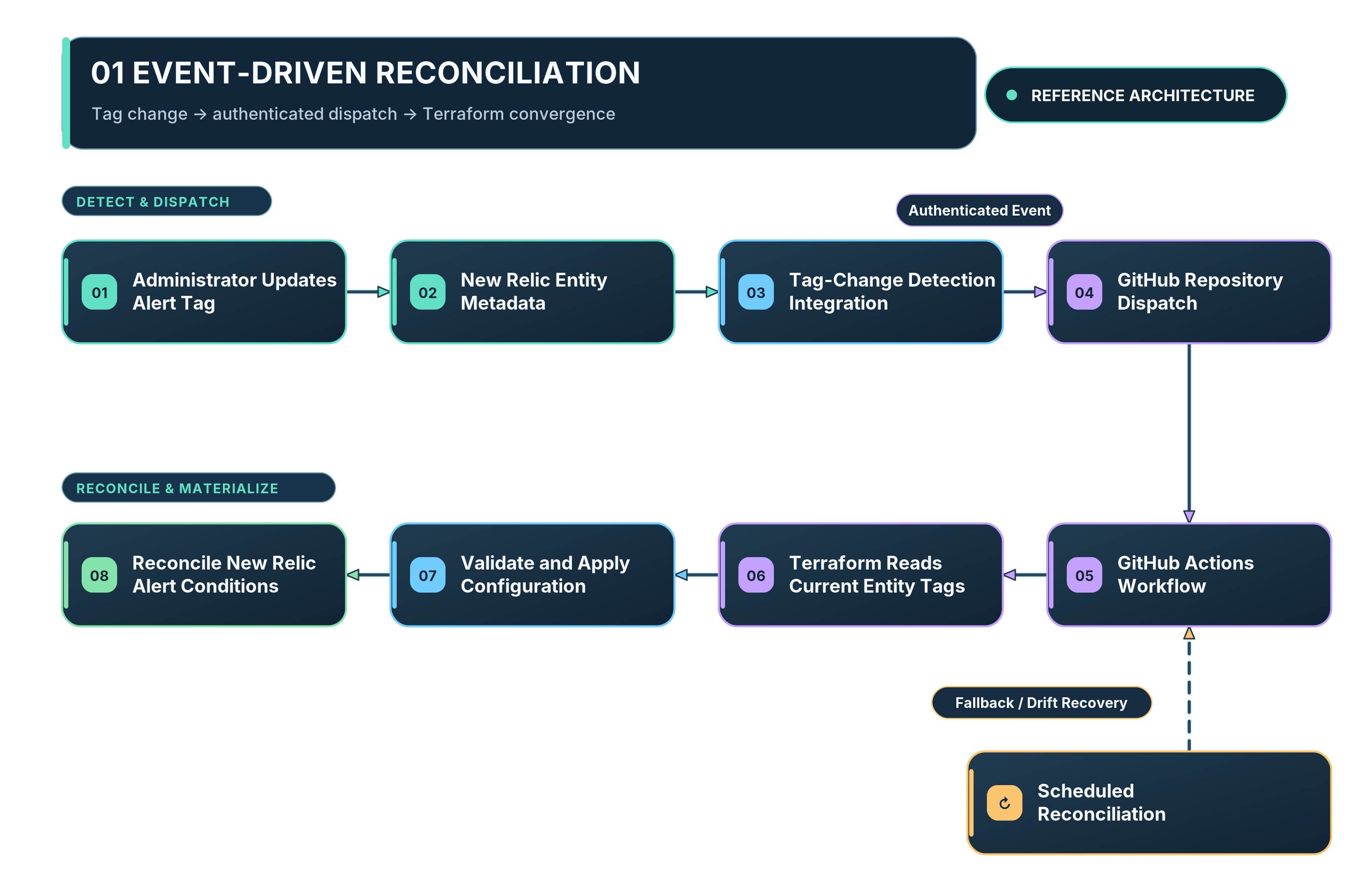
There’s one catch, however: modifying a New Relic entity tag doesn’t automatically trigger a GitHub Actions workflow.
We’d need an integration capable of detecting relevant tag changes and dispatching a workflow.
Depending on the available New Relic event and audit capabilities, that might involve a webhook integration or a small service that detects configuration changes. GitHub’s repository_dispatch API provides a straightforward way for an external system to trigger a workflow once a relevant event has been identified.
To be clear, this is how I’d extend the architecture, not how our original implementation worked. We used scheduled hourly reconciliation.
I also wouldn’t completely remove the scheduled runs.
Events can be missed, delayed, or delivered more than once. A periodic reconciliation gives us a way to recover from missed events and ensure the managed resources continue to reflect the current desired configuration.
In other words, the event shouldn’t contain instructions like “change this alert’s threshold to 300ms.”
It should simply tell our automation that something has changed and that it’s time to reconcile.
Terraform can retrieve the latest configuration and decide what, if anything, needs to happen.
That makes the event a trigger rather than another source of configuration.
For a hardened implementation, I’d also make sure the workflow has appropriate concurrency controls. We don’t want two Terraform runs attempting to update the same state simultaneously because an administrator modified several tags in quick succession.
A Few Gotchas Worth Considering
There are some less obvious consequences of building a system like this, and they’re worth discussing before anyone goes off and implements it.
Gotcha #1: You Now Have Two Configuration Surfaces
This architecture isn’t GitOps in the strict sense of Git being the sole source of desired configuration.
Our Terraform code lives in Git, but the administrator-controlled values live in New Relic.
At first glance, that might seem like a contradiction.
I don’t think it is, provided we’re explicit about what each system owns.
Git owns the implementation: the supported tag schema, the defaults, the NRQL queries, the Terraform modules, and the automation that runs them.
New Relic owns the application-specific configuration values that administrators are allowed to change.
The distinction matters because if someone directly modifies a Terraform-managed alert condition through New Relic’s UI, Terraform may overwrite that change during the next run.
But changing one of our supported configuration tags is different. That’s the intended mechanism for updating the alert.
The system works because we’ve defined which configuration belongs where.
Gotcha #2: Failed Discovery Can Be Worse Than Failed Configuration
This is probably the most dangerous implementation detail to get wrong.
Imagine Terraform queries NerdGraph and discovers 200 applications. It creates and manages the appropriate alert conditions for all of them.
Now imagine the next query fails, or returns only the first page of results, and Terraform mistakenly interprets that response as a complete list of applications.
If we’re using for_each to manage the discovered resources, Terraform may conclude that the missing applications no longer require their associated alert conditions.
And what does Terraform do when a resource that exists in state no longer exists in the desired configuration?
It plans to destroy it.
That’s not something we want happening to our monitoring infrastructure because an API request returned incomplete data.
A robust implementation needs to handle NerdGraph pagination and distinguish between a successful query returning no matching entities and a query that failed or returned incomplete results.
I’d also recommend preventing unexpected destructive plans from being automatically applied during scheduled reconciliation.
A failed reconciliation is inconvenient. Accidentally deleting a large portion of your alerting configuration is considerably worse.
Gotcha #3: Self-Service Still Needs Access Controls
Just because we’ve made alert configuration accessible through New Relic doesn’t mean everyone should be allowed to modify it.
In our environment, editing the relevant tags was restricted to designated platform and observability administrators.
That’s an important part of the design.
We wanted to remove the dependency on DevOps engineers for routine administration, not allow arbitrary users to configure production monitoring however they pleased.
And while the New Relic API key was supplied to Terraform as a variable, that doesn’t automatically mean it’s safe.
Terraform’s sensitive attribute prevents values from appearing in ordinary CLI output, but it doesn’t guarantee those values can never be exposed through state or other artifacts. Backend access, credentials, workflow permissions, and logging all need to be handled appropriately.
The automation is operating with more privileges than the administrators using its configuration interface. That separation should be deliberate.
Gotcha #4: More Alerts Doesn’t Mean Better Monitoring
Our initial implementation generated more than 360 alert conditions.
That was useful because it allowed us to standardize monitoring across a large collection of applications without configuring every alert manually.
But it introduced another problem: having hundreds of alerts doesn’t necessarily mean you have hundreds of useful alerts.
Some thresholds will be too sensitive. Others won’t be sensitive enough. Some applications behave consistently enough that fixed thresholds make sense, while others have highly variable workloads that are better suited to baseline alerting.
We still had to tune our alerting to reduce noise and improve the usefulness of the notifications we received.
The good news was that we’d made that tuning considerably easier.
Instead of having to modify Terraform every time an administrator wanted to adjust a supported threshold, they could make the change through New Relic and let the automation take care of the rest.
That didn’t eliminate the need for good observability practices, but it removed a lot of the mechanical work involved in implementing them.
Do We Really Need Another Web Application?
There’s a broader platform engineering lesson here that I think is more interesting than the Terraform implementation itself.
When we talk about self-service infrastructure, the conversation often turns toward building internal developer portals, custom dashboards, APIs, and other interfaces that sit in front of our automation.
And sometimes that’s exactly the right approach.
But before building another application, it’s worth asking whether the tools our users already work with could serve as the interface instead.
In our case, the administrators were already using New Relic. They already understood the applications, the alerts, and the monitoring configuration they needed to change.
Building a separate application where they could log in, select an application, and adjust a latency threshold would have introduced another system to develop, deploy, secure, and maintain.
What would that application really have been doing?
At its core, it would have collected a few configuration values and handed them off to some automation that updated New Relic.
We already had somewhere to store those values, and administrators already had a web interface for managing them.
So rather than building an entirely new application, we built the machinery behind the existing one.
There are certainly limits to this approach. If we needed complex configuration forms, nested data structures, approval workflows, or immediate validation and feedback, entity tags probably wouldn’t be the right interface.
But for a relatively small, well-defined set of configuration options, they worked well.
And because the underlying implementation was centralized in Terraform, we didn’t have to sacrifice consistency or maintainability to give administrators that flexibility.
Wrapping Up
What started as an effort to simplify New Relic alert management ultimately became a way to decouple the people administering our monitoring from the infrastructure used to implement it.
We used New Relic entity tags to express configuration, NerdGraph to retrieve that configuration, Terraform to translate it into managed alert conditions, and GitHub Actions to reconcile everything automatically.
The result was a system where designated observability administrators could make routine threshold changes without waiting for a DevOps engineer to edit and apply Terraform.
Along the way, we generated more than 360 alert conditions, standardized how those conditions were configured, and made subsequent tuning much easier to manage.
But the most useful takeaway isn’t the number of alerts or even the specific technologies we used.
It’s the architectural pattern.
The people using a platform shouldn’t necessarily have to interact with the tools used to build and manage it.
Sometimes the right solution is a dedicated developer portal or custom application. Other times, the interface already exists and all we need to do is connect it to the automation behind the scenes.
Before building another UI for your infrastructure, take a look at what your users are already working with.
You might find you’ve already got everything you need.
Additional Resources
If you’re interested in implementing something similar, these are good places to start:
- New Relic NerdGraph API — The GraphQL API used to discover New Relic entities and their metadata.
- New Relic Terraform Provider — Resources and data sources for managing New Relic configuration through Terraform.
- HashiCorp HTTP Provider — The generic provider used to make authenticated HTTP requests to NerdGraph.
- GitHub Actions Events — Workflow scheduling and event-based triggers.
- GitHub REST API: Repository Dispatch — A potential mechanism for building the event-driven extension discussed above.
- Terraform Sensitive Data — Considerations for protecting API credentials and other secrets used during infrastructure automation.